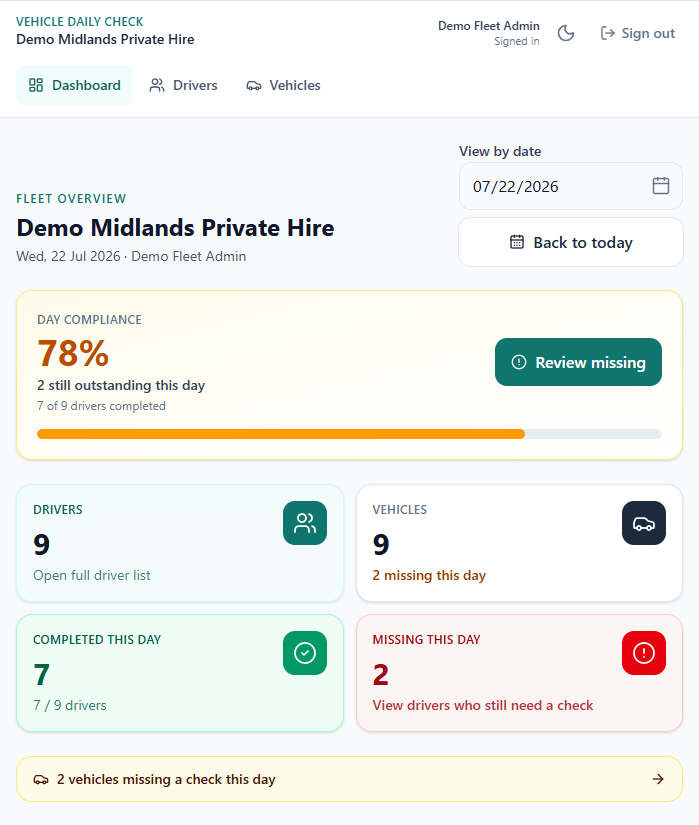
- How do I know which of my drivers completed today’s vehicle check?
- Open the fleet Compliance overview. It shows who completed today’s check and who is still missing, with a day completion view you can filter by date. Open any driver for a day-by-day timeline, or open an inspection to download PDF proof.
- How do private hire operators stop chasing daily checks on WhatsApp or Excel?
- Invite drivers to your fleet. They complete the guided checklist on their own phone. You see completions in Compliance instead of chasing group chats, shared spreadsheets or paper pads. Download a PDF when you need proof for a specific date.
- Can I use an app instead of paper daily check sheets?
- Yes. Drivers use Vehicle Daily Check on their phone for the same walkaround areas you already expect — lights, tyres, brakes and more — with optional photos and a locked timestamp. Operators get a compliance view instead of collecting sheets.
- How do I download proof of a daily check for a specific date?
- From Compliance, open the driver or vehicle, pick the date, open the inspection, then Download PDF. The export includes sections, mileage, declaration and timestamp.
- Do daily checks replace MOT or council vehicle tests?
- No. A daily walkaround is a condition check before the vehicle goes out. It does not replace the MOT, council vehicle tests, or other inspections your vehicles still need.
- Does Vehicle Daily Check create a new council mandate?
- No. It is a tool to record and prove the daily checks operators and drivers are already expected to do. It does not create a new legal requirement. Always follow your licensing authority’s conditions.
- Why do fleet operators need daily vehicle checks?
- Operators are responsible for making sure vehicles are roadworthy before use. A daily walkaround catches defects early and gives you a record if an insurer, DVSA visit or internal audit asks what happened on a specific date.
- Can each driver use their own phone?
- Yes. Drivers sign in on their phone, complete the guided checklist for their vehicle, and submit. You get a compliance overview of who completed today's check and who is still missing. No shared clipboard or Friday catch-up spreadsheet.
- What can fleet operators see?
- Fleet Admins get a Compliance view: who checked today, driver and vehicle timelines, inspection detail with photos, and PDF download. You also see calculated vehicle status (Road ready, Attention, Off road, Check missing), open faults, driver document expiries, and a Fleet Alerts list of what still needs attention. Drivers keep using the simple phone walkaround.
- What do Road ready, Attention, Off road and Check missing mean?
- These are calculated vehicle statuses on your Drivers and Vehicles lists — not labels you set by hand. Off road usually means a serious open fault or an active hold. Check missing means today’s walkaround isn’t submitted. Attention means something needs a look (for example a minor issue or a document due soon). Road ready means today’s check is done and nothing serious is left open.
- What does the Fleet Alerts bell show?
- Alerts is your fleet “needs attention” list: drivers missing today’s check, open faults, vehicles on hold, documents due or expired, waiting invites, and important updates (for example someone left). The badge counts outstanding work, not unread mail — opening a driver to look does not clear the count until the underlying problem is fixed.
- Can I see driver documents and expiries?
- Yes. Open a driver in Compliance to review their Documents board — MOT, insurance, licences and similar dates. Due-soon and expired items also surface in Fleet Alerts so you’re not chasing a spreadsheet.
- How do I invite a driver?
- In Compliance, open Drivers → Invites (the dedicated invite tab). Enter the driver’s email and send the invite. They sign in or register with that same email, then accept. When they join, they show under Drivers → Active and their daily checks appear in your fleet Compliance view.
- How do seats work?
- Each covered driver uses one seat (including you if you also drive). Pending invites on Drivers → Invites also count toward seats in use. Trial fleets are limited to 3 seats. Paid self-serve plans cover up to 50 seats — usable seats follow the Stripe-confirmed quantity. Increasing seats invoices your card immediately for the remaining days in the period (prorated). Decreasing seats: no refund for the current period; invite capacity drops once billing confirms; the next renewal bills the lower count. You cannot set capacity below seats already in use. Need more than 50 seats? Email support@vehicledailycheck.com and we will help set up a larger fleet.
- What is the maximum number of seats I can buy myself?
- Self-serve checkout and seat changes cover up to 50 seats. If you need more, email support@vehicledailycheck.com with your company name and rough seat count — we will help set up a larger fleet rather than forcing a huge checkout in the app.
- What happens when my fleet trial ends?
- Covered driver checks need an active fleet subscription after the trial. Open Billing, choose how many seats you need (not just your trial size), see the monthly total, then subscribe. That way you pay for the right capacity in one checkout.
- How do I change my card, get invoices, or cancel billing?
- Card payments are handled securely by Stripe — Vehicle Daily Check does not store your full card details. After you subscribe, open Fleet Billing → Manage billing to open the Stripe customer portal. There you can update or replace your card, download invoices and receipts, remove a payment method when Stripe allows it, and cancel so the subscription does not renew after the current period. Seat count changes stay in the app (Settings / Billing); payment method and invoice tools live in Stripe.
- How do I transfer admin to someone else?
- If they are not in the fleet yet, invite them from Drivers → Invites first. Once they are on Drivers → Active, open their profile → Manage access → Transfer admin to this person, and type TRANSFER to confirm. They become the fleet admin. Fleet billing stays with the organization, but the previous owner’s payment method will not be used for future renewals or seat increases. Current paid coverage continues through the existing billing period. The new admin must add their payment method and confirm billing takeover in Fleet Billing before renewals and seat increases resume.
- Who pays after I transfer admin?
- The fleet subscription stays with the company Stripe customer. After transfer, billing handoff starts: the previous owner’s card is disabled for future renewals, seat increases are blocked, and cover continues until the current period ends. The new admin opens Billing, adds their card, and confirms billing takeover — then renewals and seat increases resume on the new payment method.
- What happens if I cancel the fleet subscription?
- If you cancel at period end (Billing → Manage billing in the Stripe portal) or close the fleet, seat renewals stop after the current period — no further charges once that date passes. Cover continues until period end; we do not refund mid-period. If you only cancel billing, the company stays listed until you close the fleet or remove people. Closing the fleet archives the company and removes everyone now.
- How is this better than Excel for a fleet?
- Spreadsheets are easy to edit after the fact and hard to search by vehicle and date. Vehicle Daily Check stores each inspection separately, with optional photos and one-tap PDF export when you need proof — plus live status, open faults and document expiries instead of a chase list.
- What does it cost for a fleet?
- £4.99 per covered seat per month after a 7-day fleet trial (up to 3 seats, no card required to start). Self-serve covers up to 50 seats; email support@vehicledailycheck.com for larger fleets. Covered drivers do not need a personal subscription while the fleet covers them. Subscribe from Fleet Billing. See the pricing page for a worked example.